← Modern Nuclear Data Processing
ENDF/B-VIII.1 covariances · SCALE 56 groups · release v1.0
Viewing the covariance library in JANIS
The NJOY-processed 56-group covariance library can be opened in JANIS, the NEA's nuclear data display program. This page gives an example of loading the files, and summarizes the checks made with JANIS. To look at the same matrices in a web browser instead, use the covariance explorer.
1. Download the files
JANIS reads covariances in the NJOY ERRORR and BOXER formats, so use the ERRORR archive of release v1.0 (9.7 MB). JANIS cannot open the SCALE COVERX libraries in the same release.
curl -LO https://gitlab.com/api/v4/projects/86934647/packages/generic/endfb81-cov56/1.0.0/endfb81-cov56-v1.0-njoy-errorr.tar.xz
curl -LO https://gitlab.com/api/v4/projects/86934647/packages/generic/endfb81-cov56/1.0.0/SHA256SUMS
sha256sum --ignore-missing -c SHA256SUMS
tar -xJf endfb81-cov56-v1.0-njoy-errorr.tar.xz| Folder or file | Contents | JANIS format |
|---|---|---|
errorr33/ | cross-section covariances (MF33, including the resonance-parameter covariances of MF32), one tape per nuclide: 266 | ERRORR |
errorr31/ | ν̄ covariances (MF31): 73 | ERRORR |
boxer35/ | fission-spectrum covariances (MF35) as BOXER copies: 67 | BOXER |
errorr35/ | the same MF35 data as ERRORR tapes (for other codes; JANIS reads only MF33 from ERRORR) | — |
cross_material_family.cov56.errorr33 | all materials linked by cross-material blocks, in one tape | ERRORR |
2. Use JANIS 4.0
JANIS 4.1 (build 5.4.652) fails on every ERRORR tape, including NJOY's own test outputs. Use JANIS 4.0, available from the NEA as a zip; it runs on Java 8.
cd janis-4.0/software
java -Duser.language=en -Duser.country=US -Xmx2g -jar Janis.jar
3. Example: the U-238 fission covariance
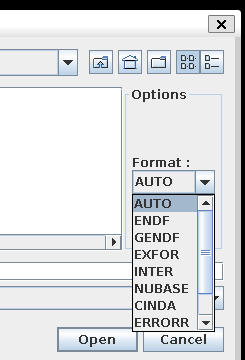
- File › Open. In Options, set Format to
ERRORR; the tapes are NJOY ERRORR output, not ENDF files. - Select
errorr33/n-092_U_238.cov56.errorr33and press Open. - In the tree, open U238 › MT=18 : (z,fission) › Covariances data (ERRORR).
- Tick M next to ERRORR Correlation matrix MT18 / MT18 to draw the map, or t for the table of values.
- The other entries under MT=18 are the correlations with other reactions of the same nuclide, for example MT18 / MT102 (fission with capture).
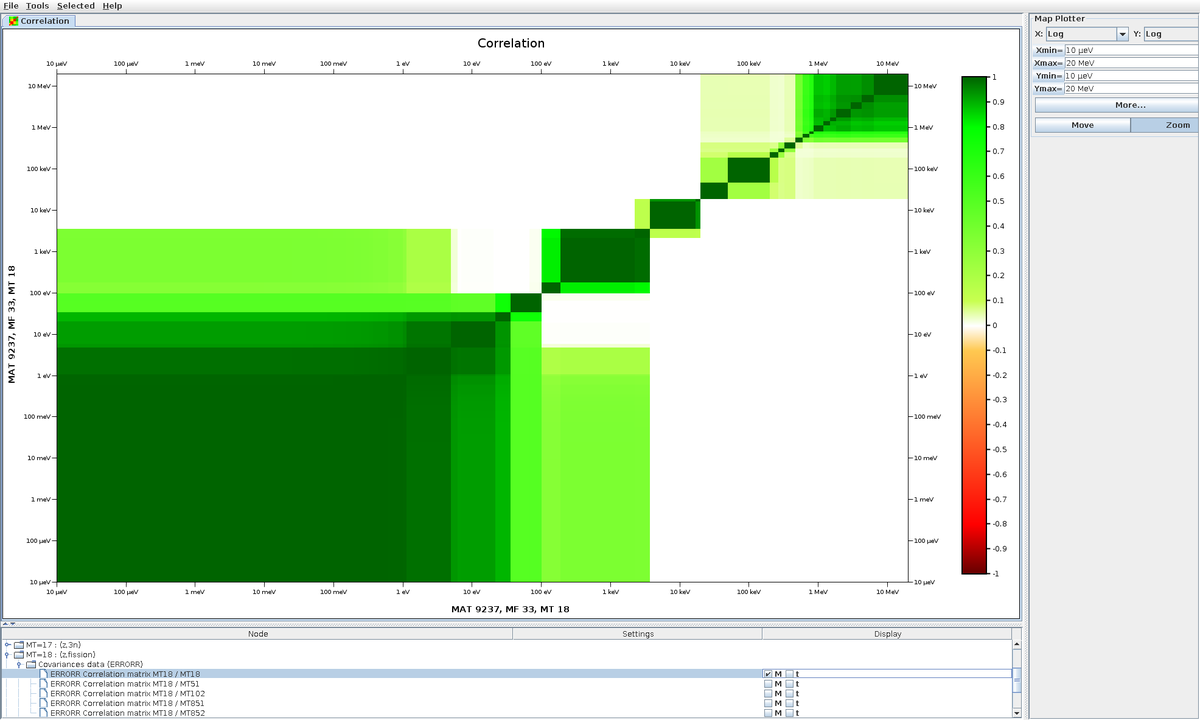
n-092_U_238.cov56.errorr33. Blocks of strong correlation follow the energy ranges of the evaluation's covariance data.4. Other files
- ν̄ (MF31):
errorr31/<nuclide>.cov56.errorr31, formatERRORR. - Fission spectrum (MF35):
boxer35/<nuclide>.cov56.boxer35, formatBOXER. - Cross-material blocks (for example U-235 fission with Au-197 capture): open
cross_material_family.cov56.errorr33. JANIS draws a cross-material block only when the partner material is in the same file, with the materials in ascending MAT order, which is why the family file exists. Openingn-092_U_235.cov56.errorr33alone shows only U-235's own matrices.
5. Loading every file in JANIS
Every file was loaded and displayed by JANIS 4.0's own code (the same import and plotting path as File › Open), run headless. The map and the table were built for every matrix.
| Files | Cases | Result |
|---|---|---|
| MF33 tapes, MF31 tapes and MF35 BOXER files | 406 | 403 load and display completely. U-233, U-235 and Au-197 display their own matrices; their cross-material blocks need the partner files (next row). |
| Cross-material family tapes | 2 | All matrices display (1155 / 1155 and 204 / 204). |
| Total | 408 | 405 OK, 3 OK with their partners loaded; every matrix displays. |
Findings from the JANIS checks. JANIS flags correlations larger than 1 in 56 matrices. That is the same set as the project's own quality report, and comes from the evaluations; those matrices are left unchanged. JANIS also imports nothing from a tape that contains NaN, which is how a problem in the W-182/183/184 tapes was found; those tapes were repaired, and the repair is recorded.
The full listing is janis_check.txt, made with janis_check.py and JanisLoadCheck.java.